

Compared to doing audits with Excel checklists or other tools
Reported by users
Manual accessibility testing and auditing
Audit
One-of-a-kind accessibility auditing software with 100% WCAG 2.2 AA coverage. Manual tests, guided tests, and automatic tests are included.
Test
The extension’s Testing tab offers a variety of guided tests that do the testing but give you the final say on the verdict.
Simulate
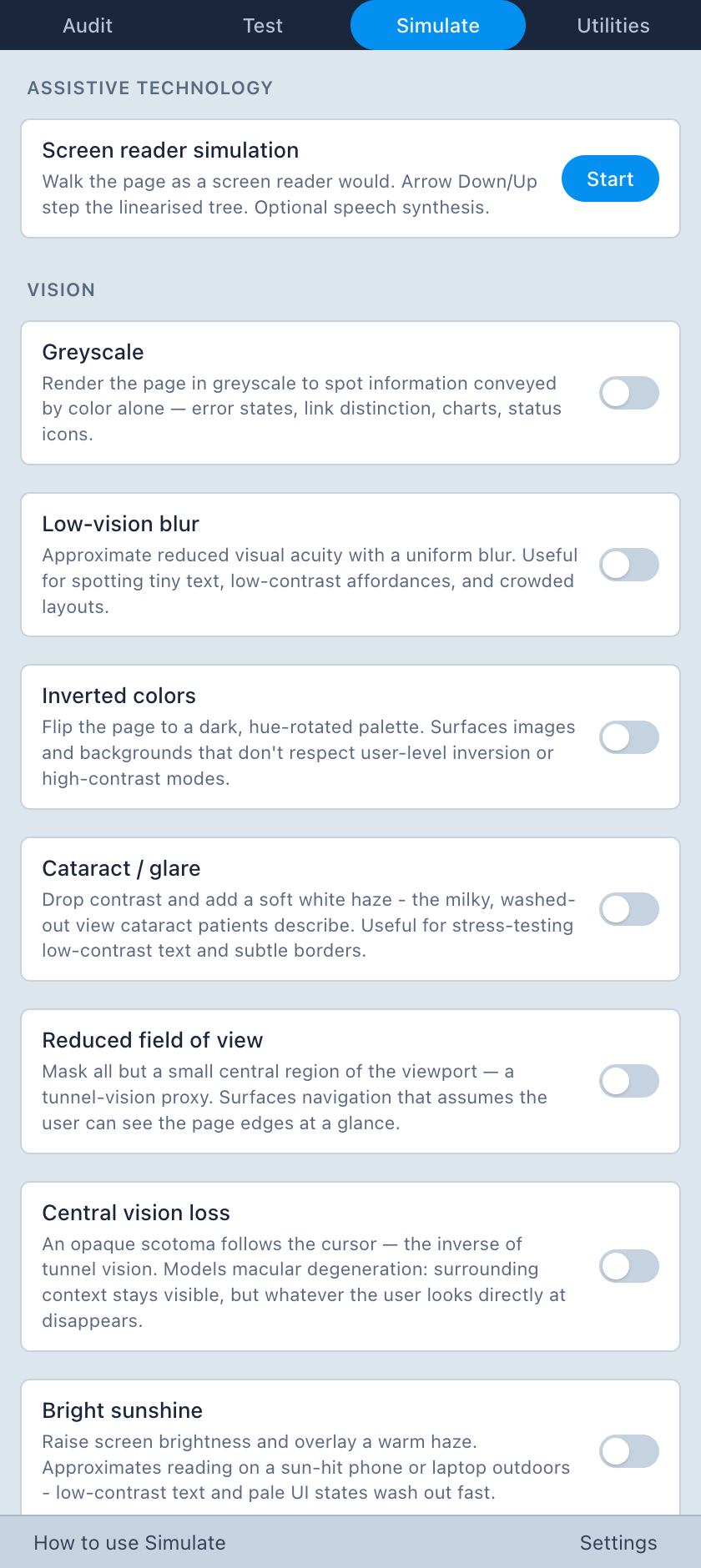
Screen reader simulations so you can instantly spot problems only screen readers can expose, and many disability simulations, all in one place.
Utilities
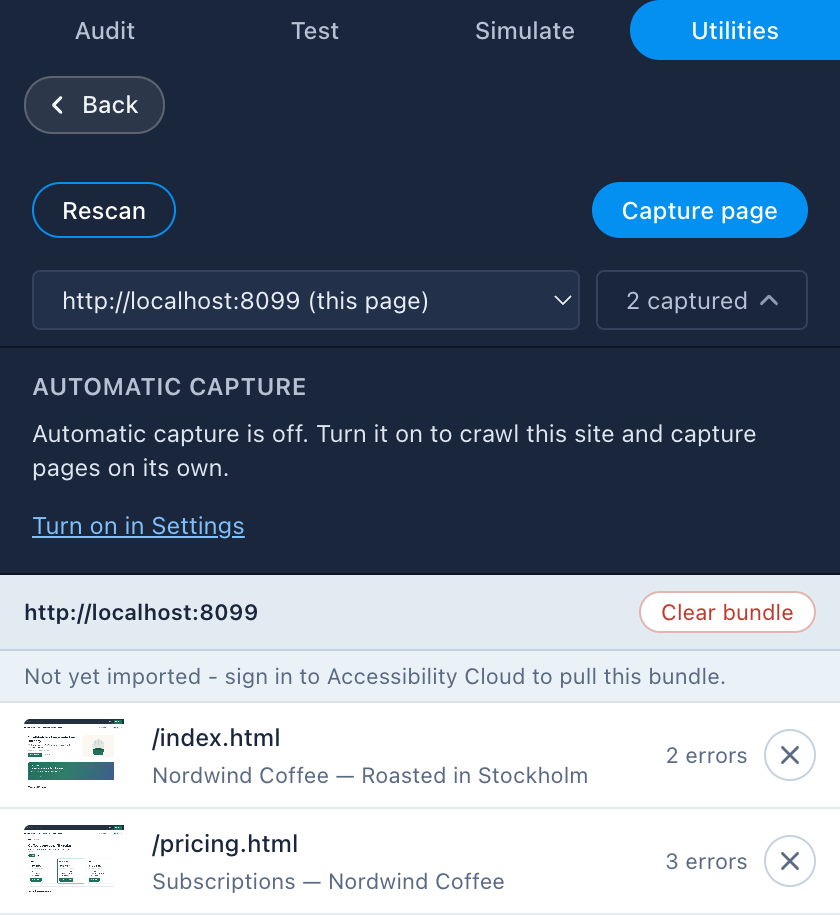
Utilities for Accessibility Cloud scan configurations: bypassing logins, creating user flows, and capturing pages that are otherwise unscannable.
Unique features
No more spreadsheets
With Companion, every test you need to conduct is at your fingertips. Tests are organized and shown based on what’s actually on the page so you only see what’s relevant.
No more collection of tools
No more jumping between testing and measurement tools, bookmarklets, screenshot capture tools, and similar. Companion offers all of them in one optimised workflow.
No more testing the same footer
Tested the footer? Why test again on another page? Many accessibility testing tools are not smart enough to track test results between samples. Companion is.
A full manual WCAG audit normally means a spreadsheet, a stack of browser tabs, and days of repeating the same checks page after page. Accessibility Cloud Companion collapses that work into a guided flow inside your browser, and regular users report getting through audits up to 10 times faster.
Checklist built from the page
Companion detects 34 component types and only offers the tests that apply to what it finds, plus a small set of page-level checks (whole page, animations, draggable elements) that always deserve a manual look.
Judge each component once
Judge an element once, and that verdict is carried to every other page where the same element appears. Site-wide navigation, footers, cookie banners, and design-system components are evaluated once, not on every page.
Automatic screenshots
Mark a test as failed and Companion scrolls the element into view, screenshots the correct element, draws a red outline around it, and stores it with the finding. You can also paste or upload your own screenshots.
Download Companion now
Companion is free. Auditing, tests, disability simulations, the screen reader simulation, capture, and every utility. You only need an Accessibility Cloud account for pulling your findings into Accessibility Cloud to produce downloadable audit reports. If you are an individual accessibility tester, that account is free too.
Audit
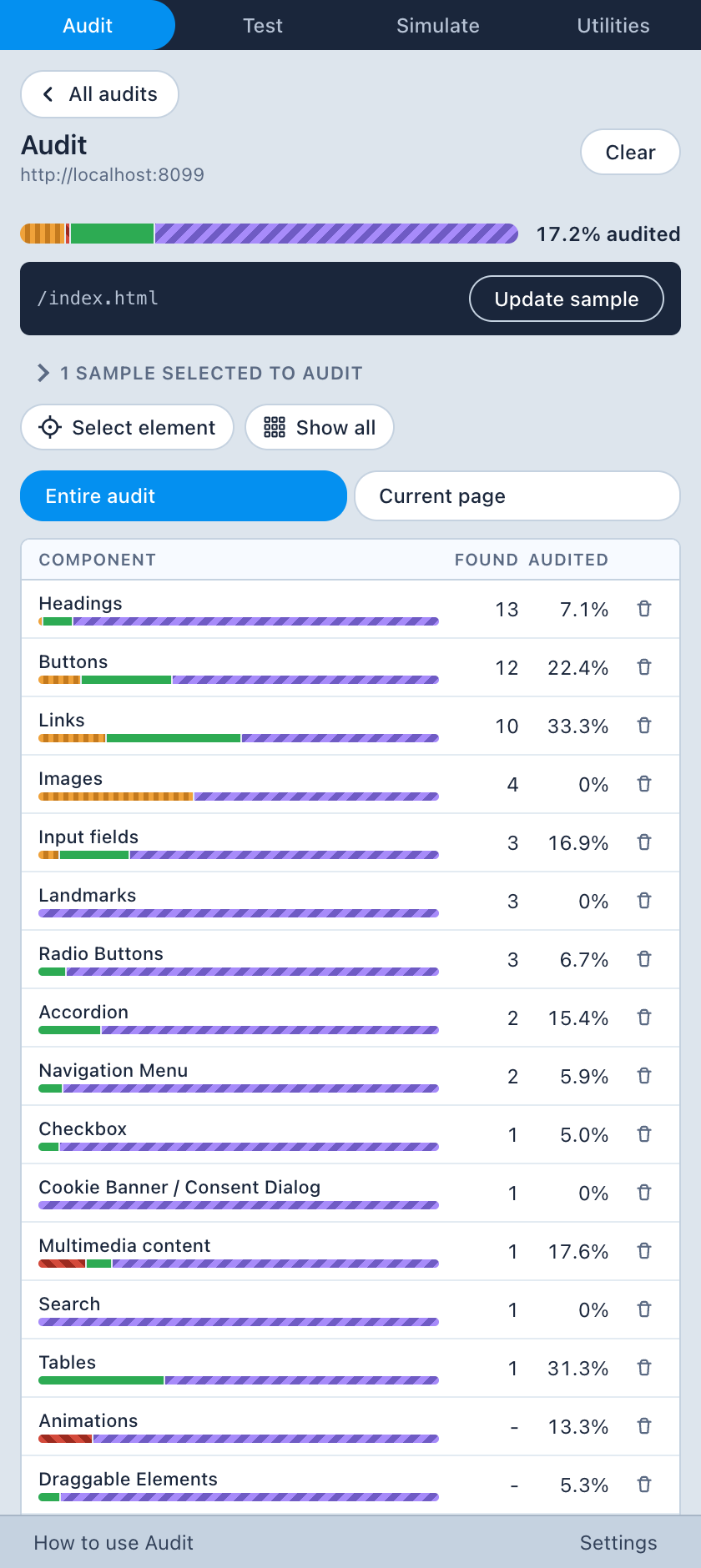
Smart auditing
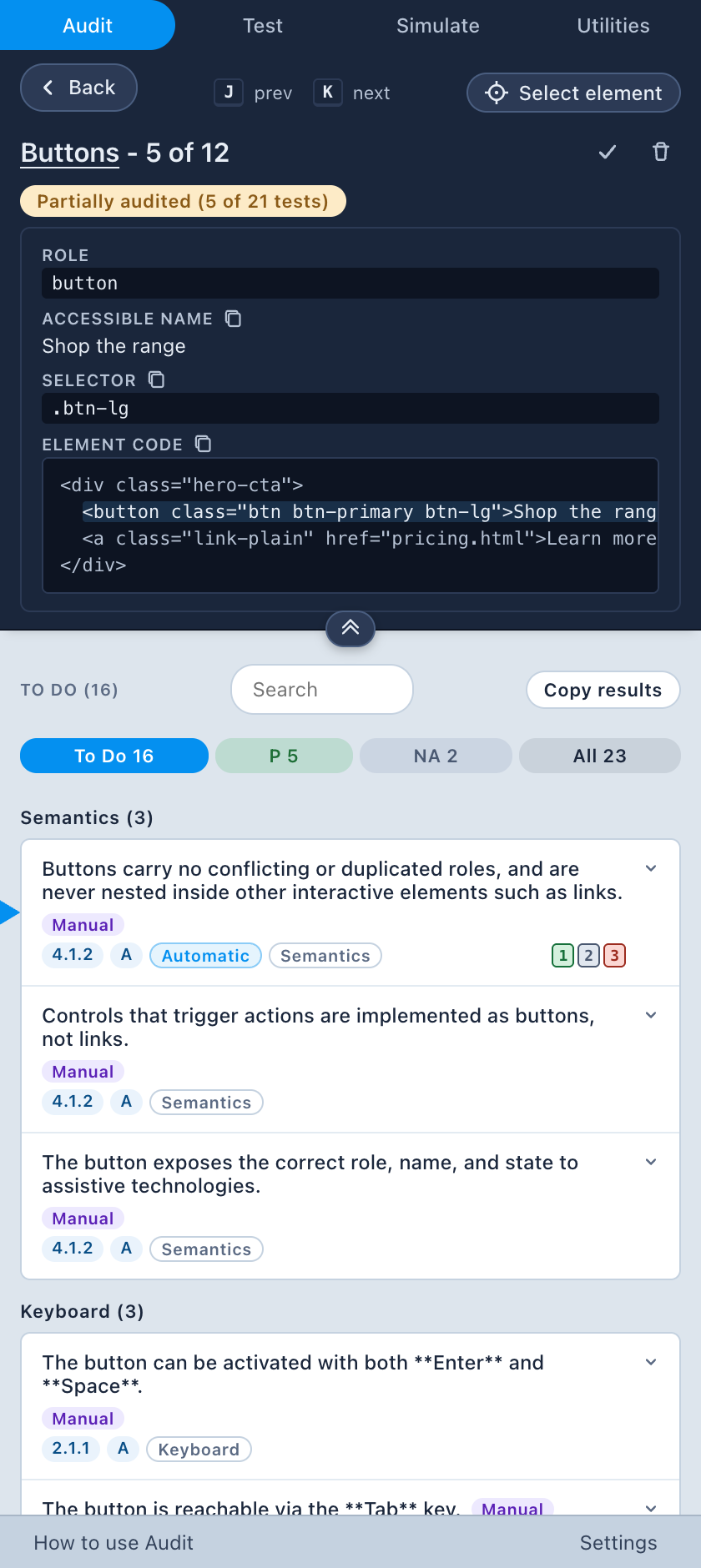
Every element is identified as a component and a checklist of tests for it is built. Every test comes with how-to-test instructions, and turns into problem statements when you file your failure. Even the screenshot is automatic.
Testing included
Companion automatically tests what it can, flags what you should review, offers guided tests where you see test results and have total control over the verdict, and supplies you with a list of manual tests you should do yourself.
Sibling elements
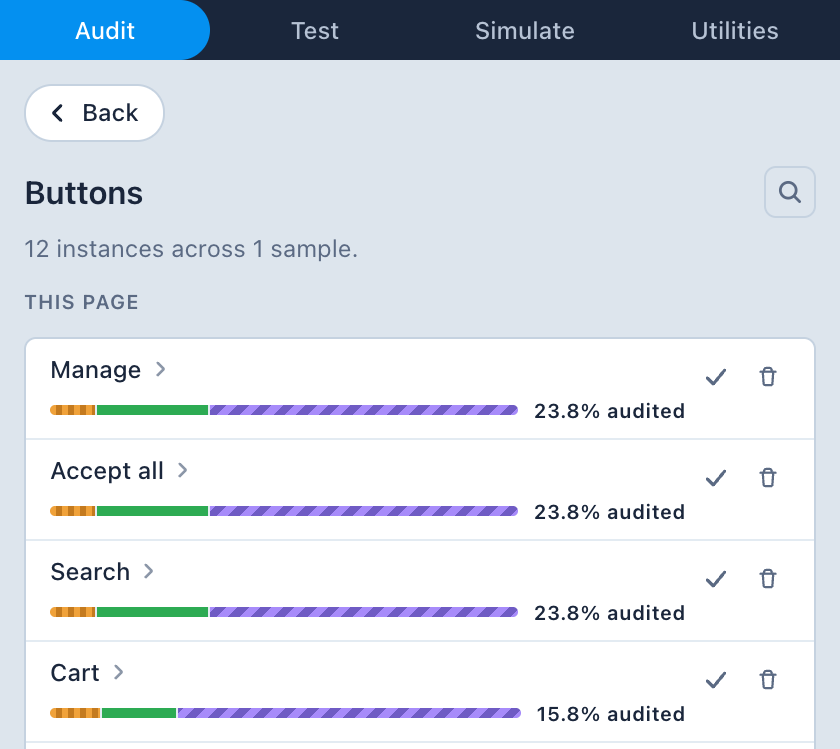
If you audited an element that repeats itself many times on the page, you can copy and paste your test results and verdicts from one sibling component to another, or to all siblings at once.
Custom findings
You can create custom findings for problems you discovered on your own. Companion suggests hundreds of frequently encountered accessibility problems as snippets and prefills everything for you, including the screenshot.
Bird’s-eye view
You can easily observe your progress for a single component, or for a type of component, for a single sample, or for an entire audit. So you can say: this link is 100% audited, all links of this page 39%, all links of all pages 22%.
Test
Guided tests that do the testing and leave the verdict to you
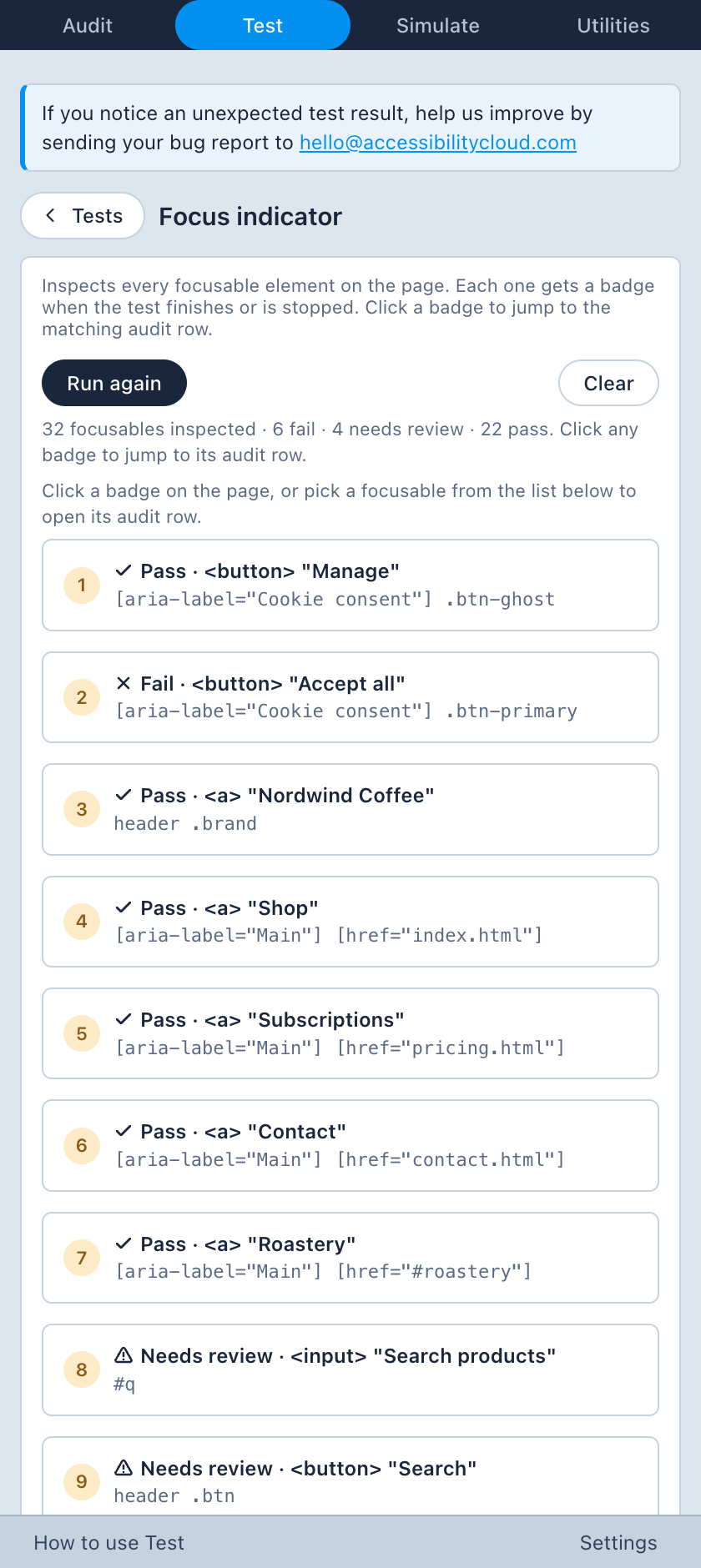
Interactive tests you activate on the page you’re on. Your verdicts, recorded in a test, flow straight back into the matching audit row, and a “back to test” pill returns you to the test.
Headings
Industry’s most comprehensive headings tests. Companion runs 24 heading tests on every page you select as a sample, so heading problems stand out at a glance. Select a flagged heading to report it as a failure in your audit.
It finds missing or multiple H1s, skipped levels and illogical heading order, empty, vague and overly long headings, duplicate headings, text styled as a heading but not marked up as one, accordions and tab lists without headings, invalid aria-level values, headings hidden from screen readers, and more.
Tab stops
Records the keyboard focus order and draws numbered markers with connecting lines directly on the page: the fastest way to see DOM-order versus visual-order mismatches. Click any marker to jump into that element’s audit row.
Focus indicator
Walks every focusable element automatically and tests to find out whether a focus indicator actually paints, by capturing before and after screenshots of focus states and diffing the pixels around the element.
Color contrast
The industry’s most comprehensive color contrast testing. Automatic, semi-automatic, and manual color contrast testing not only for text, but also for non-text, such as form elements.
Disable CSS
Strips every author stylesheet so you can check that content order and meaning survive without presentation, then you record verdicts on what you find.
Reflow
Zooms the page to a 320 CSS px equivalent width and badges every element that overflows horizontally or covers content or wastes too much screen space.
Resize text
Scales text to 200% and badges containers that clip, overlap, or hide their content. A text-spacing transform is also available directly from the relevant audit rows.
Simulate
Feel the barriers instead of reading about them. Many stackable simulations applied to the live page. Also, a screen reader simulation that lets you see problems that surface on screen readers, without using one.
Vision
- Greyscale
- Low-vision blur
- Inverted colours
- Cataract / glare
- Reduced field of view
- Central vision loss
- Bright sunshine
Colour blindness
- Achromatopsia
- Protanopia
- Deuteranopia
- Tritanopia
Hearing
- Presbyacusis
- Low-frequency loss
- Tinnitus
- Hyperacusis
- Auditory processing difficulty
Motor
- Pointer tremor
- Keyboard only
Cognitive
- Slow reading pace
- Dyslexia
- ADHD / cognitive overload
Screen reader simulation
Simulation brings the benefits of finding missing accessible names, wrong roles, unannounced status messages, and reading-order surprises before you ever open NVDA, but it doesn’t replace actual screen reader testing as it is just a simulation.
- the page linearised into announceable rows, in document order, with role, accessible name, and state,
- NVDA / JAWS / VoiceOver announcement formats,
- spoken output with automatic walk-through, mute, stop/resume, and per-row language detection so a French paragraph on an English page is read with a French voice,
- a live-region log showing the last few aria-live announcements, with assertive ones highlighted,
- the current row outlined on the live page and scrolled into view,
- keyboard control (arrows to step, Enter to activate, Esc to stop),
- elements with no accessible name flagged.
Utilities
Capture
Test pages that require a login, or those on localhost, on a local network, or behind a VPN. Capture pages one by one, or let the extension crawl them for you. Then you can import them to Accessibility Cloud.
User flows
Press record, follow your user flow, and let it get recorded, step by step. Paste the configuration to Accessibility Cloud to test and monitor your user flow in the future. Every error found in your user flow is shown incrementally.
Scan settings
Easily copy the page’s properties to Accessibility Cloud’s scan settings, including cookies, local storage, session storage, or an element selector so your Accessibility Cloud scans retain those properties over time.
Download Companion now
Companion is free. Auditing, tests, disability simulations, the screen reader simulation, capture, and every utility. You only need an Accessibility Cloud account for pulling your findings into Accessibility Cloud to produce downloadable audit reports. If you are an individual accessibility tester, that account is free too.
Download Companion now
Companion is free. Auditing, tests, disability simulations, the screen reader simulation, capture, and every utility. You only need an Accessibility Cloud account for pulling your findings into Accessibility Cloud to produce downloadable audit reports. If you are an individual accessibility tester, that account is free too.
Download Companion now
Companion is free. Auditing, tests, disability simulations, the screen reader simulation, capture, and every utility. You only need an Accessibility Cloud account for pulling your findings into Accessibility Cloud to produce downloadable audit reports. If you are an individual accessibility tester, that account is free too.